
3 Legged Authorization
Basic Steps
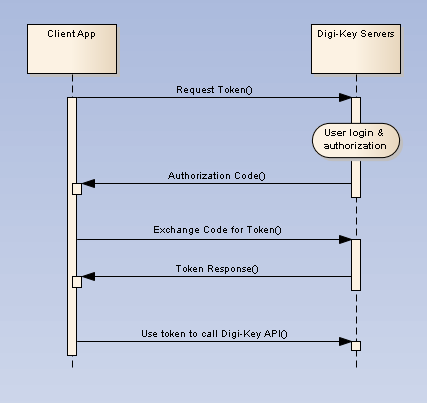
All client applications, both Production and Sandbox, follow a basic pattern when making requests to a Digi-Key API with the OAuth 2.0 framework.
Register an Application
When you create your application, you are given an OAuth2 client ID and client secret. Copy and secure this information for your client application.
Get an Authorization Code
Get an authorization code by having the end user authenticate themselves by logging into their DigiKey account. After login the user is asked to authorize access for the client application to the user's DigiKey account. When the user grants permission, DigiKey's authorization server responds with an authorization code. If the user does not grant the permission, the authorization server returns an error.
Get an access token
Get an access token by sending the authorization code, client id, client secret, and grant type to the authorization server’s token endpoint. You will receive an access token and a refresh token.
Send the access token to an API
By passing the access token with a request header, the client application can now make requests to the DigiKey API it is subscribed to. When the access token expires, the client application can submit the stored refresh token to receive a new set of credentials.
Production Application
Contained below is the necessary information to complete the OAuth process for Production Applications. Before continuing please confirm that a client application is registered, its client id and client secret are stored and secured, and its subscribed to a Production API Product.
Getting the Authorization Code
The endpoint for authentication of the user, this is done in a browser:
Production Authorization Endpoint | Description |
|---|---|
This endpoint is the target of the initial request. It handles authenticating the user and user consent. The result includes the authorization code. |
The set of required query parameters to send url encoded in the browser:
Parameter | Values | Description |
|---|---|---|
response_type | code | Tells the Authorization Server to return an authorization code. |
client_id | The client id assigned to the registered application. | Identifies the client that is making the request. The value passed in this parameter must exactly match the value assigned by the API Portal. |
redirect_uri | Developer defined redirect URI | Determines where the response code is sent. The value of this parameter must exactly match the URI provided when the application was registered (including trailing '/'). The redirect_uri is provided by the client. The redirect_uri must use TLS (https://) to securely receive the code. |
state (optional) | An opaque value used by the client to maintain state between the request and callback. | The authorization server includes this value when redirecting the user-agent back to the client. The parameter SHOULD be used for preventing cross-site request forgery. |
An example url encoded code request with the required query parameters:
https://api.digikey.com/v1/oauth2/authorize?response_type=code&client_id=123456789abcdefg&redirect_uri=https%3A%2F%2Fclient-app-redirect-uri%2F
Bold in the example above highlights the url encoding of characters. The character ":" is url encoded as "%3A" . The character "/" is url encoded as "%2F"
As seen in browser:

Handling the Response
The response will be sent to the redirect URI as specified in the request URL (and as registered to the application). If the user approves the access request, then the response contains an authorization code. If the user does not approve the request, the response contains an error message. All responses are returned to the browser on the query string, as shown below:
An error response:
https://client-app-redirect-uri/code?error=access_denied
An authorization code response:
https://client-app-redirect-uri/code?code=lboI52TG&scope=&state=nullNote: The code (ex: lboI52TG) will expire one minute from creation
Getting the Access Token
After the browser receives the authorization code, your application must exchange the authorization code for an access token and a refresh token. The URL used to get your token is:
Access Token Endpoint | Description |
|---|---|
This endpoint is the target of the second request. The result of requests to this endpoint includes the access token and refresh token |
The request for an access token is an HTTPS POST request and must include the following x-www-form-urlencoded data:
Field | Description |
|---|---|
code | The authorization code returned from the initial request. The code expires one minute after creation |
client_id | The client id assigned to the registered application. |
client_secret | The client secret assigned to the registered application. |
redirect_uri | Determines where the response code is sent. The value of this parameter must exactly match the URI defined when the application was registered (including trailing '/'). The redirect_uri is provided by the client. Fill in the client application's registered value for the redirect_uri. |
grant_type | As defined in the OAuth 2.0 specification, this field must contain the value authorization_code. |
An example of an access token POST request:
POST /v1/oauth2/token HTTP/1.1 Host: api.digikey.com Content-Type: application/x-www-form-urlencodedcode=lboI52TG&
client_id={application_client_id}&
client_secret={application_client_secret}&
redirect_uri=https://client-app-redirect-uri&
grant_type=authorization_code
A successful response to this request contains these fields:
Field | Description |
|---|---|
access_token | The token sent to access a DigiKey API. |
refresh_token | A token that can be submitted to obtain a new access token. |
expires_in | The remaining lifetime of the access token, in seconds. |
refresh_token_expires_in | The remaining lifetime of the refresh token, in seconds. |
token_type | The token type being returned. |
A successful response is returned as a JSON object.
Example response to a successful access token request:
{ "access_token": "SLKDosk89/DOSID-frt3234SLsofds", "refresh_token": "oPu5qu7wPhuVBcTZqmx4NFfhlnSB6hVUJ5uSIhS0CM", "expires_in": 1799, "refresh_token_expires_in": 7775999, "token_type": "BearerToken", } Note: Other fields may be included in the response, and your application should not treat this as an error. The set shown above is the minimum set.
Using the Refresh Token
As indicated in the previous section, a refresh token is obtained when you get your initial access token. Your application may obtain a new access token by sending the refresh token to DigiKey's Authorization Server.
To obtain a new access token this way, your application sends an HTTPS POST request to the token endpoint,
https://api.digikey.com/v1/oauth2/token
The request must include this set of required parameters:
Field | Description |
|---|---|
client_id | The client id assigned to the registered application. |
client_secret | The client secret assigned to the registered application. |
refresh_token | The stored refresh token to submit. |
grant_type | As defined in the OAuth 2.0 specification, this field must contain a value of refresh_token. |
An example refresh token POST request:
POST /v1/oauth2/token HTTP/1.1 Host: api.digikey.com Content-Type: application/x-www-form-urlencodedclient_id={application_client_id}&
client_secret={application_client_secret}&
refresh_token=123Asfeksodk/jkdsoieDSioIOS-483LidkOOl&grant_type=refresh_token
As long as the user has not revoked the access granted to your application, the response provides a new set of tokens.
Example response to a successful refresh token request:
{ "access_token": "SLKDosk89/DOSID-frt3234SLsofds", "refresh_token": "oPu5qu7wPhuVBcTZqmx4NFfhlnSB6hVUJ5uSIhS0CM", "expires_in": 1799, "refresh_token_expires_in": 7775999, "token_type": "BearerToken", } Note: The refresh token is regenerated each time you get a new access token. You must use the latest refresh token to get a new access token. Previous refresh tokens will no longer be valid.
Code and Token Expiration Time
Type | Expires in |
|---|---|
Authorization Code | 1 minute |
Access Token | 30 minutes |
Refresh Token | Does not expire |
Making an API Call
With OAuth completed the application can send a request.
Organization application example request (Production)
Example request to PartSearch using organization credentials and endpoint (api.digikey.com):
GET /Search/v3/Products/p5555-nd HTTP/1.1Host: api.digikey.comX-DIGIKEY-Client-Id: heWGx9w6DK8kZf3jRv5E9jUAhXrGBU67Authorization: Bearer s4T5DbmFZadjNRAEbUnN9zkU3DBjX-DIGIKEY-Locale-Site: USX-DIGIKEY-Locale-Language: enX-DIGIKEY-Locale-Currency: USDX-DIGIKEY-Locale-ShipToCountry: usX-DIGIKEY-Customer-Id: 0
The Value of the Authorization header must be prefixed with "Bearer"
e.g.: "Authorization": "Bearer xGr69sdAjLmnAHwGF4R1HedfDHl3j"
or you will get a Bearer token error.
Accessing a Sandbox Application
The process to access a Sandbox application is the same as for a Production application.
The only difference is that the Host name is sandbox-api.digikey.com.